
Last updated: 20 August 2026
How to Withdraw from HFM
This page explains how to withdraw funds from HFM (HF Markets) — the methods, limits and processing time, plus the key rule that withdrawals go from your myWallet. To withdraw, log in to My HFM, move funds from your trading account to myWallet via an Internal Transfer, then request the withdrawal.
Honest note: HFM operates via an offshore entity (FSA Seychelles) and is not Bappebti-registered in Indonesia. Withdrawals go back to a payment method in your own name — third-party transactions are prohibited. Forex/CFD trading is high risk; most retail accounts lose money.
In short: the HFM minimum withdrawal is from Rp100,000. E-wallets are usually instant to 10 minutes; bank transfer takes 10 minutes up to 24 hours. HFM charges no withdrawal fee on its side*, but timing depends on the method, KYC and server hours — details below.
🏧 Withdraw from HFM
You request withdrawals in the Client Area after logging in (last checked 20 Aug 2026). Only log in on an official HFM domain.
- Minimum
- From Rp100,000
- Where from
- myWallet (transfer from trading account first)
- Methods
- OVO, DANA, Online Bank Transfer (A/B/C)
- Fee
- No HFM withdrawal fee*; bank may charge
- Time
- E-wallet instant–10 min; bank 10 min–24 h*
How to withdraw (step by step)
- 1
Log in to your My HFM Client Area (my.hfmtrade-ind.com) or the HFM app.
- 2
Do an Internal Transfer: move funds from your trading account to your myWallet.
- 3
Open Withdrawal and choose a method (OVO, DANA, or Online Bank Transfer).
- 4
Enter the amount and your account details — the name must match your identity exactly.
- 5
Submit the request; funds are processed according to the method and server hours.
HFM withdrawal methods (Indonesia)
For Indonesian clients, HFM lists these withdrawal methods with the following limits:
| Method | Min | Max | Fee | Time |
|---|---|---|---|---|
| OVO E-Wallet | Rp100,000 | Rp10,000,000 | No fee* | Up to 10 min |
| DANA E-Wallet | Rp100,000 | Rp20,000,000 | No fee* | Instant |
| Online Bank Transfer (A/B/C) | Rp100,000 | Rp100,000,000 | No fee* | 10 min – 24 h |
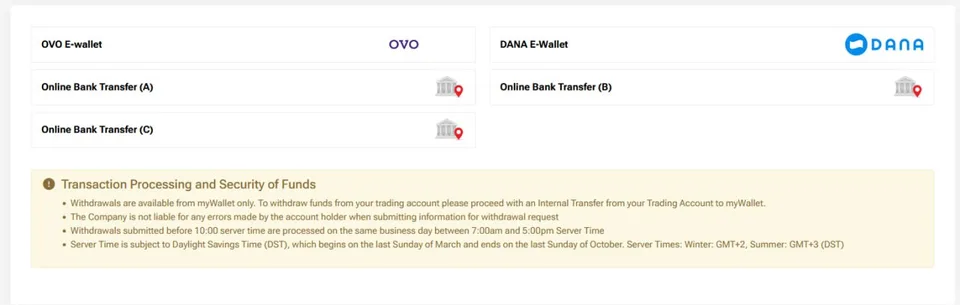

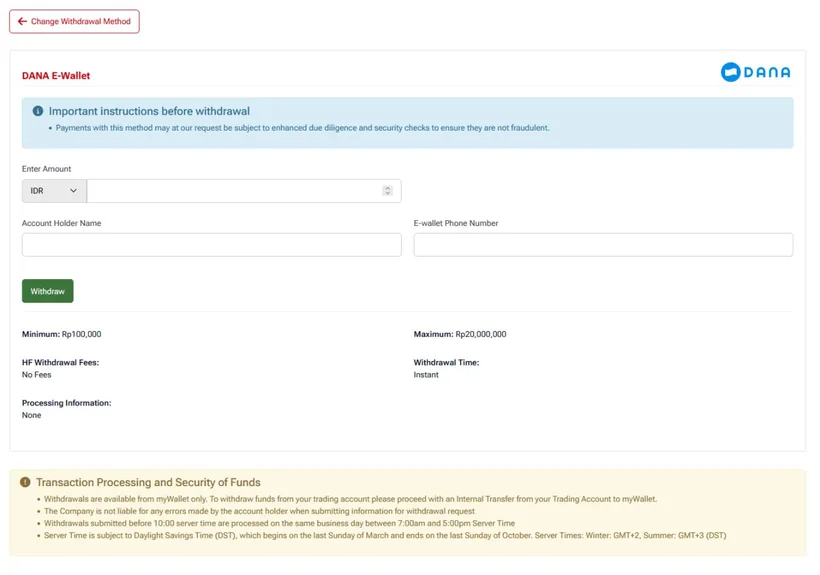
Screenshots of HFM's Client Area withdrawal methods, for illustration.
"No fee" is HFM's own charge on these methods*; your bank may still charge one. Amounts observed 20 Aug 2026 — confirm current limits in the Client Area.
Tips for a fast HFM withdrawal
- Make sure funds are already in myWallet (Internal Transfer from the trading account).
- Enter the account name and number exactly as on your bank/e-wallet.
- Submit during server working hours (avoid 23:00–05:00 GMT+7).
- Finish KYC first so the request isn't held.
- Use an e-wallet (DANA / OVO) for the fastest payout.
Important withdrawal rules & timing
- Withdrawals come from your myWallet — transfer from the trading account to myWallet first.
- The account holder name must exactly match your bank/e-wallet; a mismatch can cause the funds to be returned.
- Requests submitted before 10:00 server time are processed the same business day between 07:00 and 17:00 server time.
- Server time is GMT+2 (winter) / GMT+3 (summer, DST).
- Avoid submitting between 23:00–05:00 GMT+7 (bank maintenance = slower); 05:00–23:00 GMT+7 is recommended.
- Withdrawals are processed on business days — weekends and holidays can make bank payouts slower.
Withdrawal delayed or rejected? Common causes
- Funds still in the trading account — do an Internal Transfer to myWallet first.
- Name mismatch — the account name must match your identity exactly.
- Outside processing hours or bank maintenance (23:00–05:00 GMT+7) — wait for working hours.
- Account not verified — finish KYC before withdrawing.
- Amount over/under the method limits — check the min/max above.
Can't open the site to withdraw? ("Internet Positif")
If the HFM website is blocked in Indonesia, use the HFM app to withdraw — app access isn't affected by ISP DNS blocking. You can also try the my.hfmtrade-ind.com domain, a public DNS (1.1.1.1 / 8.8.8.8), or a VPN — always on an official HFM domain, and never enter your password on a fake page.
HFM withdrawal FAQ
What is the minimum withdrawal on HFM?
From Rp100,000 across the Indonesian methods (OVO, DANA, Online Bank Transfer). Always confirm current limits in the Client Area.
What withdrawal methods does HFM support?
For Indonesia: OVO E-Wallet, DANA E-Wallet, and Online Bank Transfer (A/B/C). You withdraw from your myWallet.
How long does an HFM withdrawal take?
E-wallets are usually instant to 10 minutes; Online Bank Transfer takes 10 minutes up to 24 hours, depending on server hours and bank processing.
Does HFM charge a withdrawal fee?
HFM shows no withdrawal fee on its side*, but your bank may charge one. Check current terms in the Client Area.
Why is my HFM withdrawal delayed?
Usually funds not yet in myWallet, a name mismatch, submitting during bank maintenance hours, an unverified (KYC) account, or exceeding limits.
Do I have to transfer to myWallet before withdrawing?
Yes. Withdrawals come from myWallet, so do an Internal Transfer from your trading account to myWallet first, then request the withdrawal.
Can I withdraw via the HFM app?
Yes. Log in to the app, transfer to myWallet, open Withdrawal, choose a method and submit. Useful when the website is blocked.
Can I withdraw HFM funds to someone else's account?
No. Third-party transactions are prohibited — withdrawals must go to a bank account or e-wallet in your own name, matching your account identity.
Which HFM withdrawal method is fastest?
DANA e-wallet is usually instant; OVO up to 10 minutes; Online Bank Transfer 10 minutes to 24 hours depending on server hours and the bank.